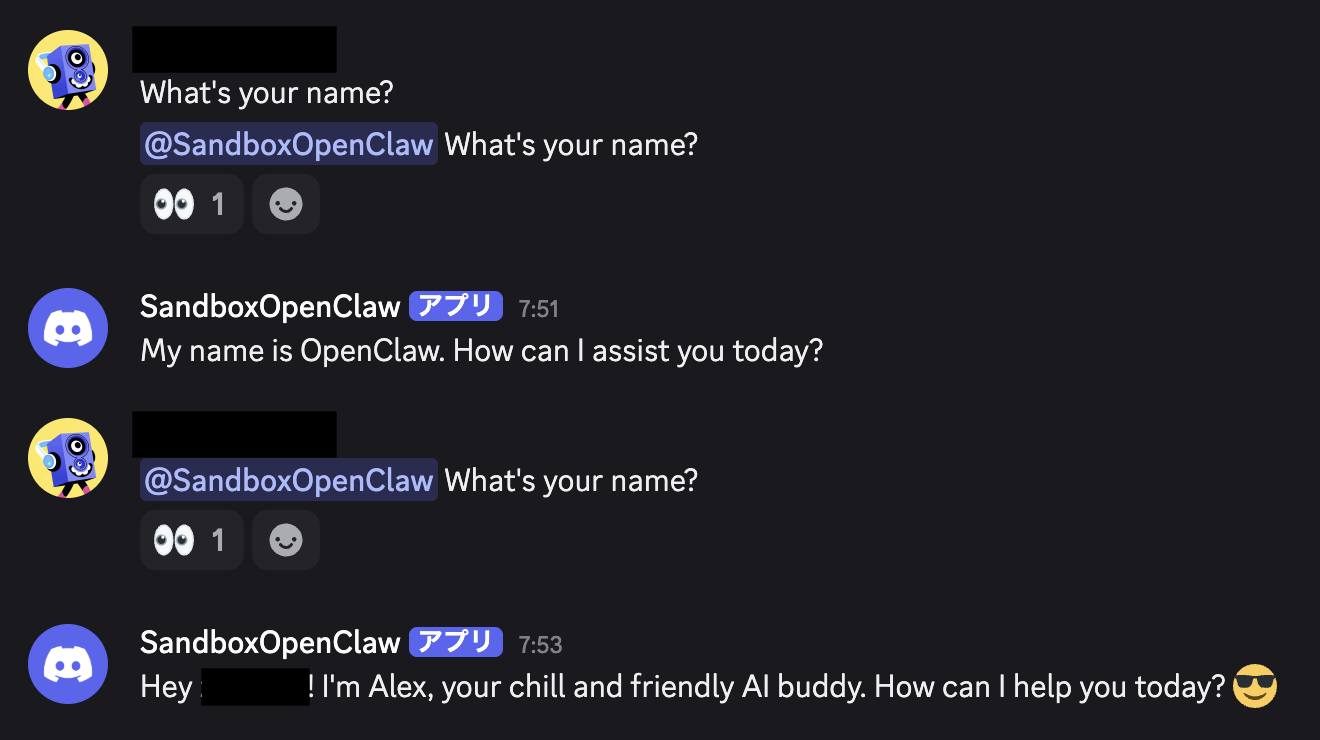
I recently set up an environment just like the title says, so I’m leaving the steps here as a personal reference.
I spent more time than expected on the Discord bot setup, so I’m including those steps here. On the other hand, creating a test server/channel and getting API keys such as the OpenAI API key were straightforward, so I’m assuming those parts are already done.
Discord Bot Setup
Since I mainly interact with the agent through Discord, I add the bot to a channel on my own server. This section covers that setup.
Create an application
Log in to the Discord Developer Portal, go to Applications, and click New Application to create one.
Configure the application
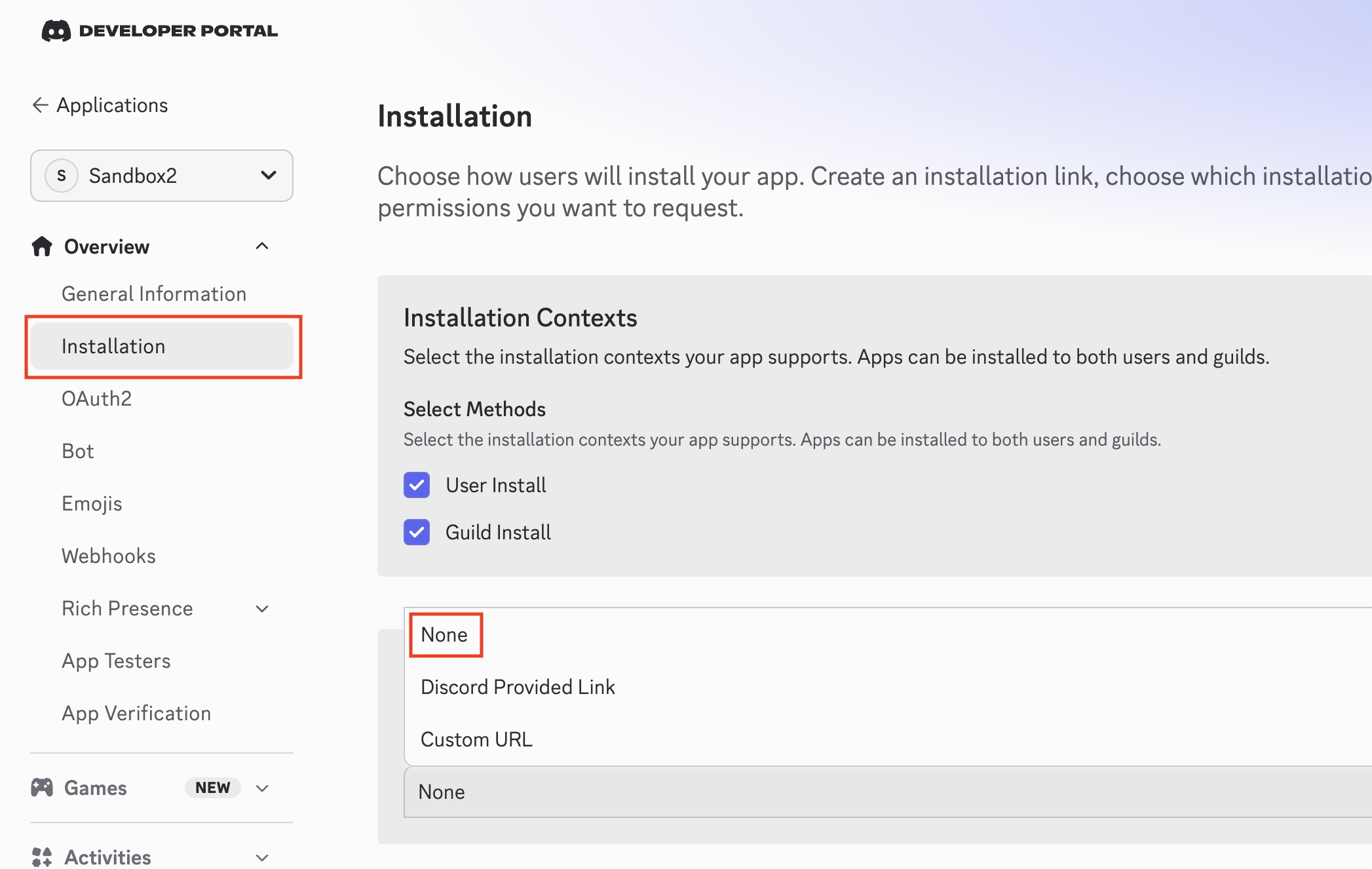
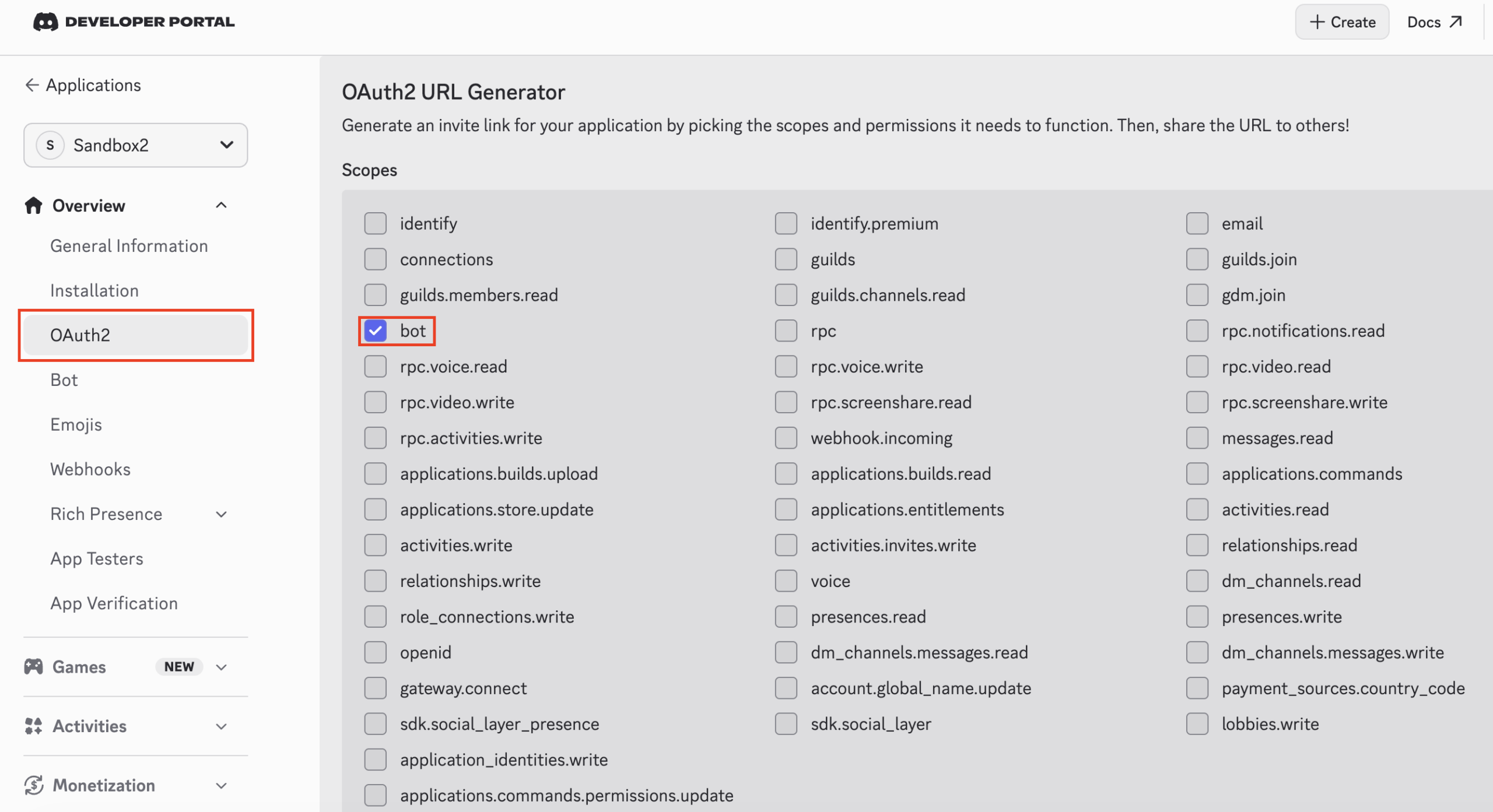
To make it possible to turn off Public Bot, go to Installation, set Install Link to None, and then click Save Changes at the bottom of the page. If you skip this, Discord shows the following error when you try to disable Public Bot:
Private application cannot have a default authorization link.
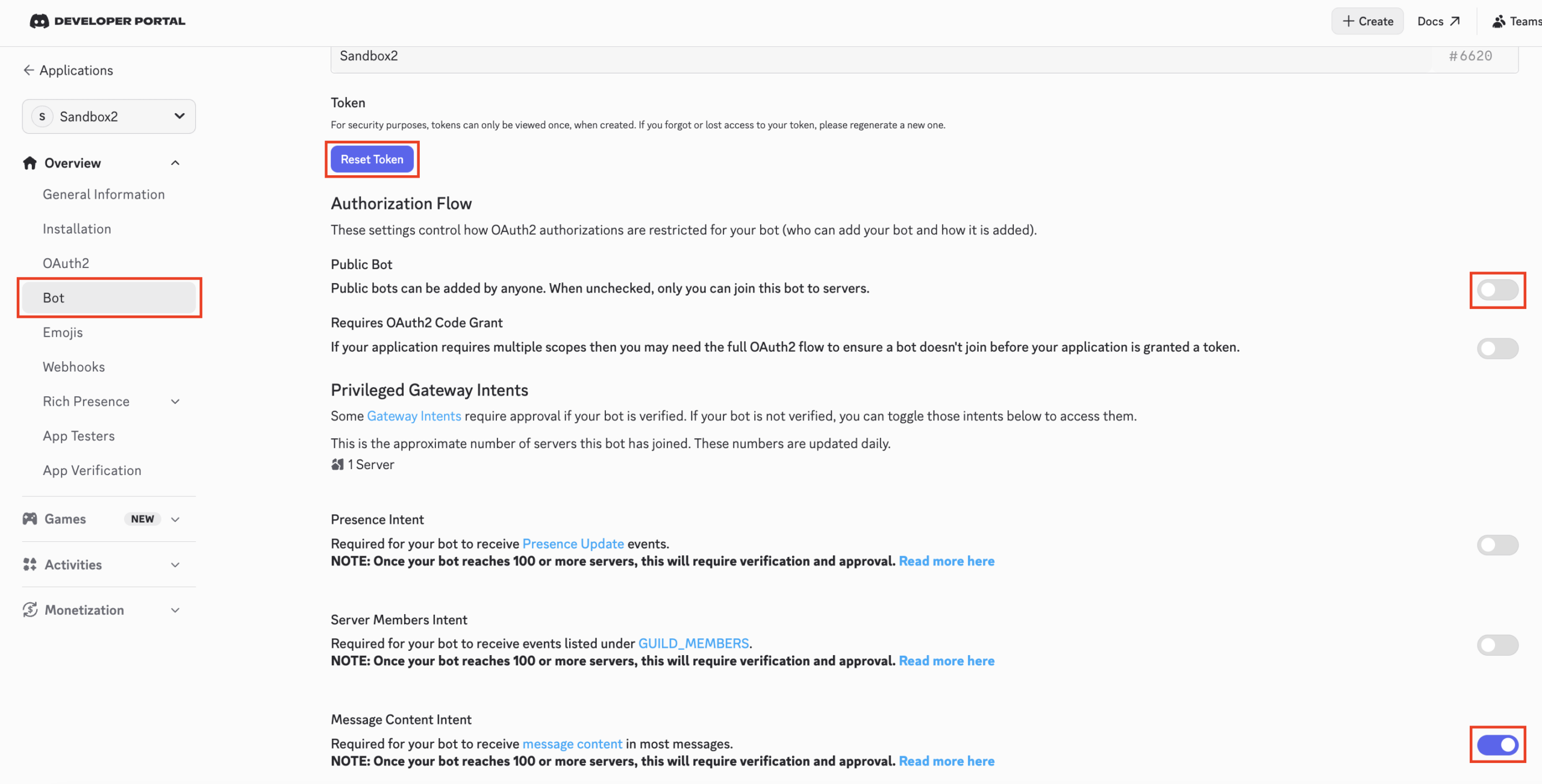
Next, under Bot, turn Public Bot off, turn Message Content Intent on, and save the changes. After that, click Reset Token, then click the confirmation button that appears, authenticate if needed, and make a note of the displayed token because you will use it later.
Add the bot to your server
Generate an invite link for the bot.
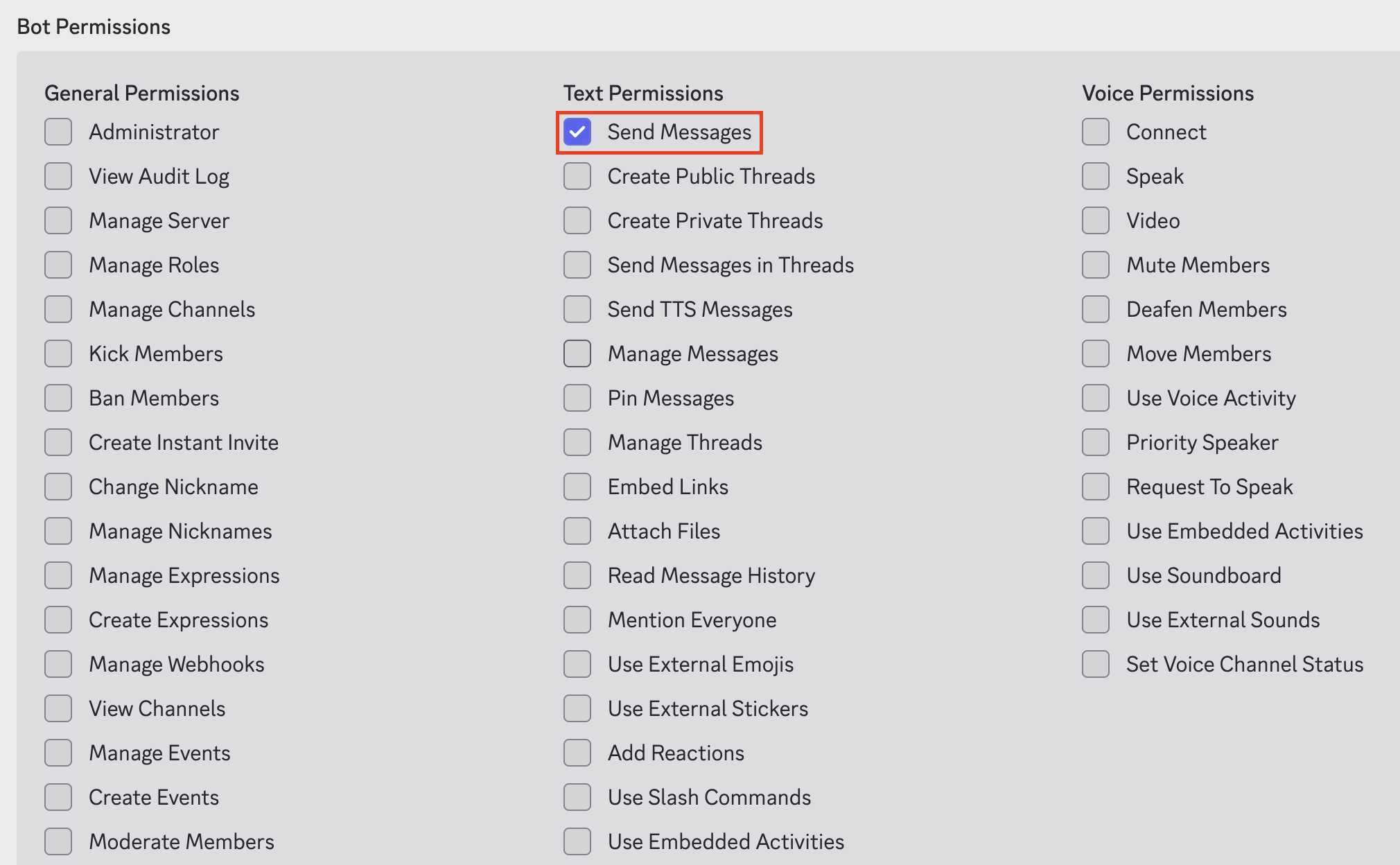
Under OAuth2 → OAuth2 URL Generator, check bot under Scopes and Send Messages under Bot Permissions, then copy the Generated URL shown at the bottom.
Paste that generated URL into your browser’s address bar and open it. You will then be able to add the bot to your server.
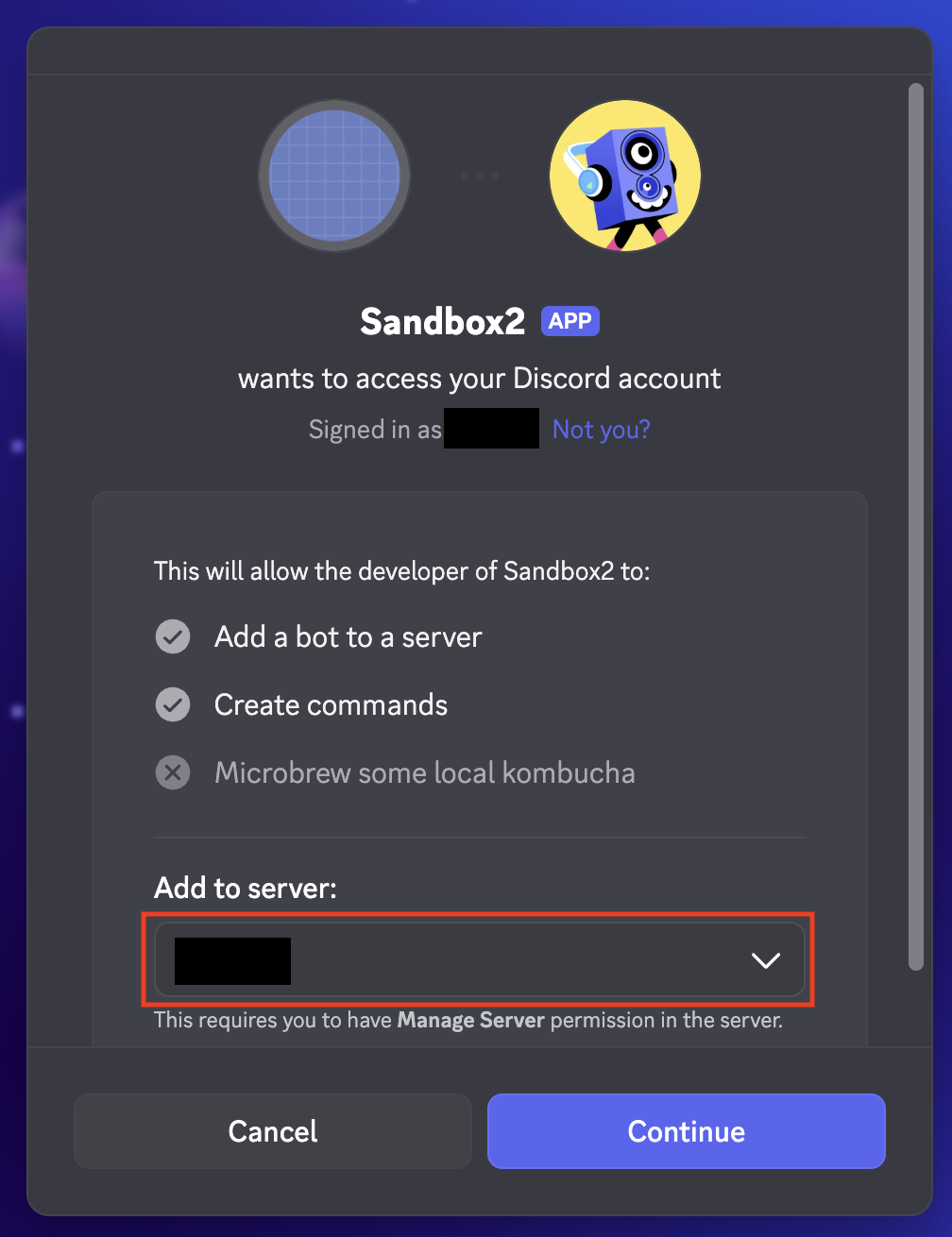
In Add to Server, select the server you want the bot to join, then click Continue.
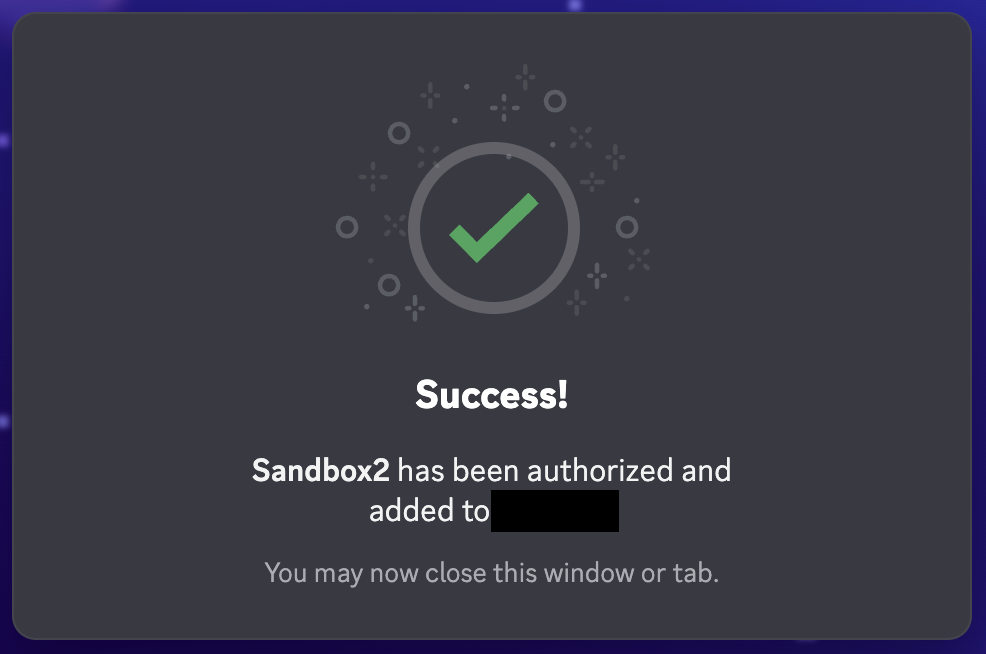
On the next screen, if everything looks fine, click Authorize to proceed.
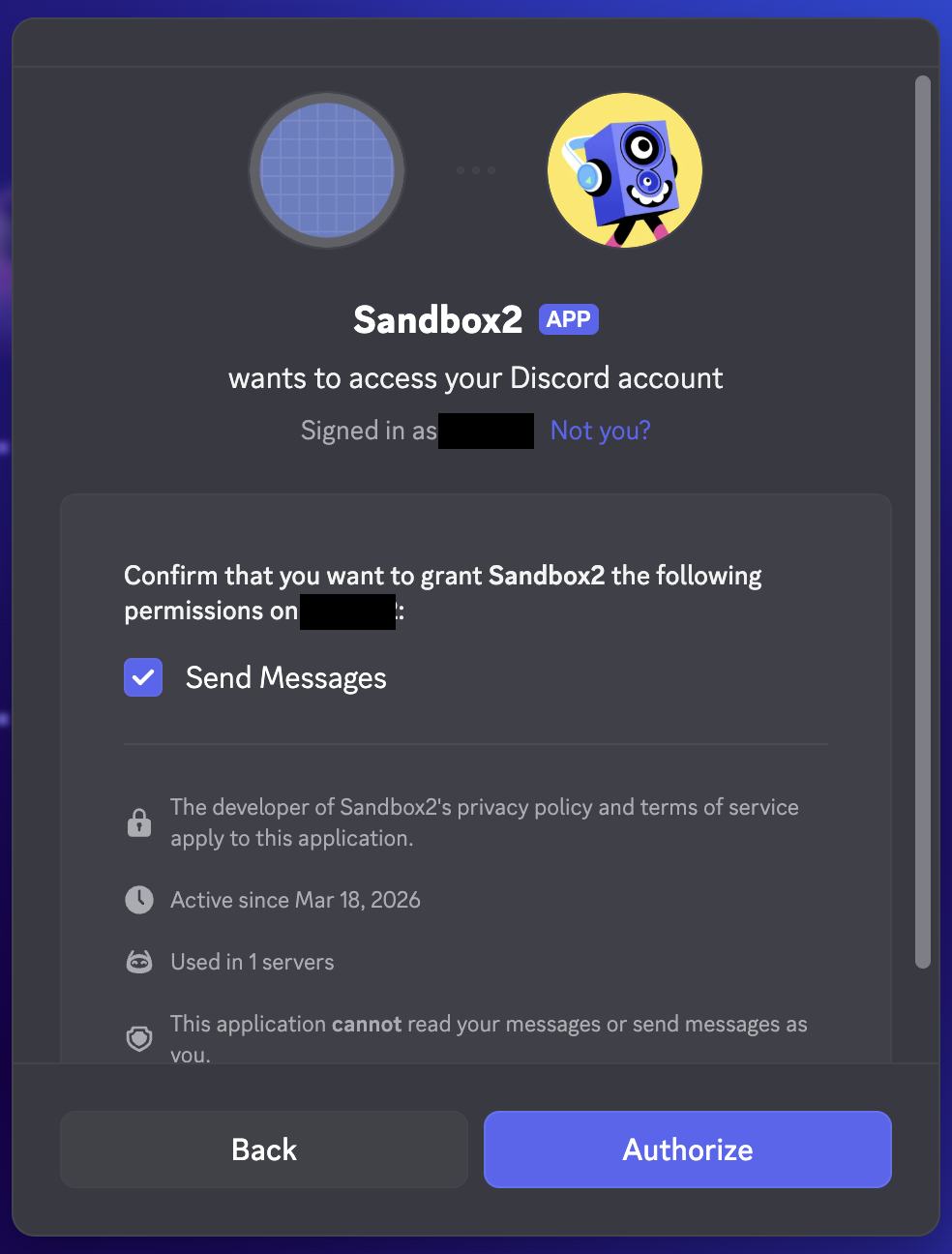
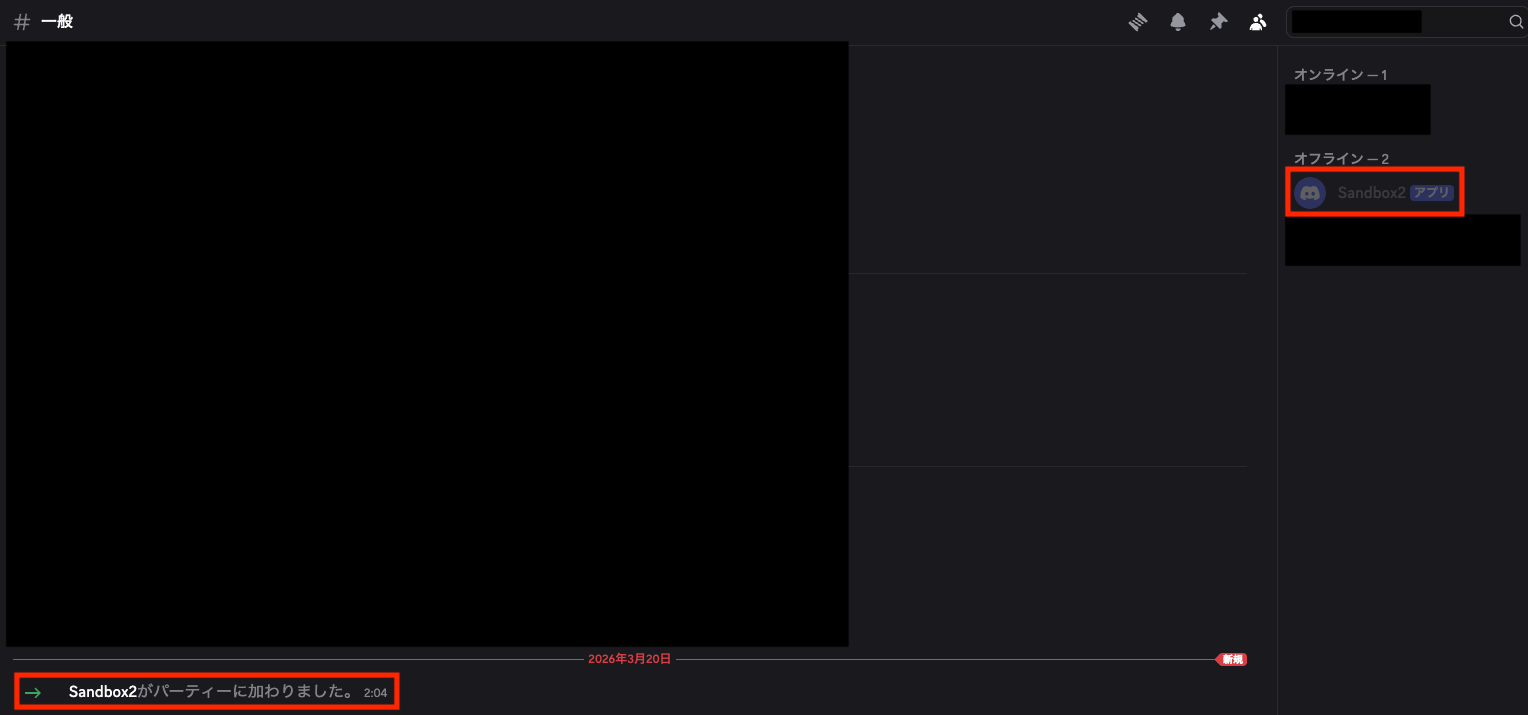
That’s it. The bot will now be added to your server.
Build the Container Image
Prepare the following files, then build the image and start the container.
.
├── .env
├── Dockerfile
├── entrypoint.sh
└── openclaw.json.template
File Contents
Dockerfile
entrypoint.sh
#!/usr/bin/env bash
set -euo pipefail

# Restrict default permissions for newly created files and directories
umask 027

# Use application directories based on HOME
OPENCLAW_HOME="${OPENCLAW_HOME}"
LOG_DIR="${OPENCLAW_HOME}/logs"

# Validate required environment variables
: "${OPENCLAW_GATEWAY_TOKEN:?OPENCLAW_GATEWAY_TOKEN is required}"
: "${DISCORD_BOT_TOKEN:?DISCORD_BOT_TOKEN is required}"
: "${DISCORD_GUILD_ID:?DISCORD_GUILD_ID is required}"
: "${DISCORD_CHANNEL_ID:?DISCORD_CHANNEL_ID is required}"

# Create required directories
mkdir -p "${LOG_DIR}"

# Generate the runtime config from the template
envsubst '${DISCORD_GUILD_ID} ${DISCORD_CHANNEL_ID}' \
  < "${OPENCLAW_HOME}/openclaw.json.template" \
  > "${OPENCLAW_HOME}/.openclaw/openclaw.json"

# Start OpenClaw Gateway and write its log under OPENCLAW_HOME
openclaw gateway --port 18789 --allow-unconfigured --verbose \
  > "${LOG_DIR}/openclaw-gateway.log" 2>&1 &
OPENCLAW_PID=$!

# Stop child process when the container receives a signal
cleanup() {
  kill "${OPENCLAW_PID}" 2>/dev/null || true
}
trap cleanup INT TERM EXIT

sleep 5

# For docker logs command
echo "OpenClaw Gateway: http://127.0.0.1:18789"
echo "Locale:           ${LANG}"

tail -F "${LOG_DIR}/openclaw-gateway.log"
openclaw.json.template
{
    "gateway": {
        "mode": "local",
        "bind": "lan",
        "port": 18789,
        "auth": {
            "mode": "token",
            "token": "${OPENCLAW_GATEWAY_TOKEN}"
        },
        "controlUi": {
            "allowedOrigins": [
                "http://127.0.0.1:18789",
                "http://localhost:18789"
            ],
            "allowInsecureAuth": true
        }
    },
    "agents": {
        "defaults": {
            "workspace": "~/.openclaw/workspace",
            "model": {
                "primary": "openai/gpt-4.1-mini"
            },
            "subagents": {
                "maxSpawnDepth": 2,
                "maxChildrenPerAgent": 5,
                "maxConcurrent": 8,
                "runTimeoutSeconds": 900
            }
        },
        "list": [
            {
                "id": "main",
                "default": true,
                "workspace": "~/.openclaw/workspace",
                "tools": {
                    "profile": "coding"
                }
            }
        ]
    },
    "tools": {
        "profile": "coding",
        "exec": {
            "applyPatch": {
                "enabled": true,
                "workspaceOnly": true
            }
        }
    },
    "session": {
        "dmScope": "per-channel-peer"
    },
    "channels": {
        "discord": {
            "enabled": true,
            "token": "${DISCORD_BOT_TOKEN}",
            "groupPolicy": "allowlist",
            "streaming": "off",
            "guilds": {
                "${DISCORD_GUILD_ID}": {
                    "requireMention": true,
                    "ignoreOtherMentions": true,
                    "channels": {
                        "${DISCORD_CHANNEL_ID}": {
                            "allow": true
                        }
                    }
                }
            }
        }
    }
}
.env
The contents of .env are shown below. Replace the values with your own. For OPENCLAW_GATEWAY_TOKEN, the output of openssl rand -hex 32 is fine. You can find DISCORD_GUILD_ID and DISCORD_CHANNEL_ID from the channel URL in the form https://discord.com/channels/<GUILD_ID>/<CHANNEL_ID>.
OPENAI_API_KEY=your_openai_api_key
OPENCLAW_GATEWAY_TOKEN=replace_with_a_random_secret
DISCORD_BOT_TOKEN=your_discord_bot_token
DISCORD_GUILD_ID=your_discord_guild_id
DISCORD_CHANNEL_ID=your_discord_channel_id
Build and Run
You can build and run it with the following commands. If you do not need to persist the volume, you can remove the -v option from docker run.
$ docker build -t openclaw-lab .

$ docker run -d --rm \
  --name openclaw-lab \
  --hostname openclaw-lab \
  -p 127.0.0.1:18789:18789 \
  -p 127.0.0.1:19123:19123 \
  -v openclaw-lab:/home/openclaw/.openclaw \
  --env-file .env \
  openclaw-lab:latest

$ docker logs openclaw-lab
OpenClaw Gateway: http://127.0.0.1:18789
Locale:           ja_JP.UTF-8
2026-03-26T10:32:02.119+09:00 [discord] startup [default] deploy-commands:start 1004ms native=on reconcile=on commandCount=37 gatewayConnected=false reconnectAttempts=0
2026-03-26T10:32:02.120+09:00 [discord] native commands using Carbon reconcile path
2026-03-26T10:32:02.123+09:00 [discord] startup [default] deploy-rest:put:start 1009ms path=/applications/1478743940097380573/commands commands=37 bytes=11922
2026-03-26T10:32:02.479+09:00 [discord] startup [default] deploy-rest:put:done 1363ms path=/applications/1478743940097380573/commands requestMs=354
2026-03-26T10:32:02.482+09:00 [discord] startup [default] deploy-commands:done 1367ms gatewayConnected=false reconnectAttempts=0
2026-03-26T10:32:02.484+09:00 [discord] startup [default] fetch-bot-identity:start 1369ms gatewayConnected=false reconnectAttempts=0
2026-03-26T10:32:02.640+09:00 [discord] startup [default] gateway-debug 1523ms WebSocket connection opened
2026-03-26T10:32:02.696+09:00 [discord] startup [default] fetch-bot-identity:done 1580ms botUserId=1478743940097380573 botUserName=SandboxOpenClaw gatewayConnected=false reconnectAttempts=0
2026-03-26T10:32:02.732+09:00 [discord] client initialized as 1478743940097380573 (SandboxOpenClaw); awaiting gateway readiness
2026-03-26T10:32:03.008+09:00 discord voice: autoJoin: 0 entries
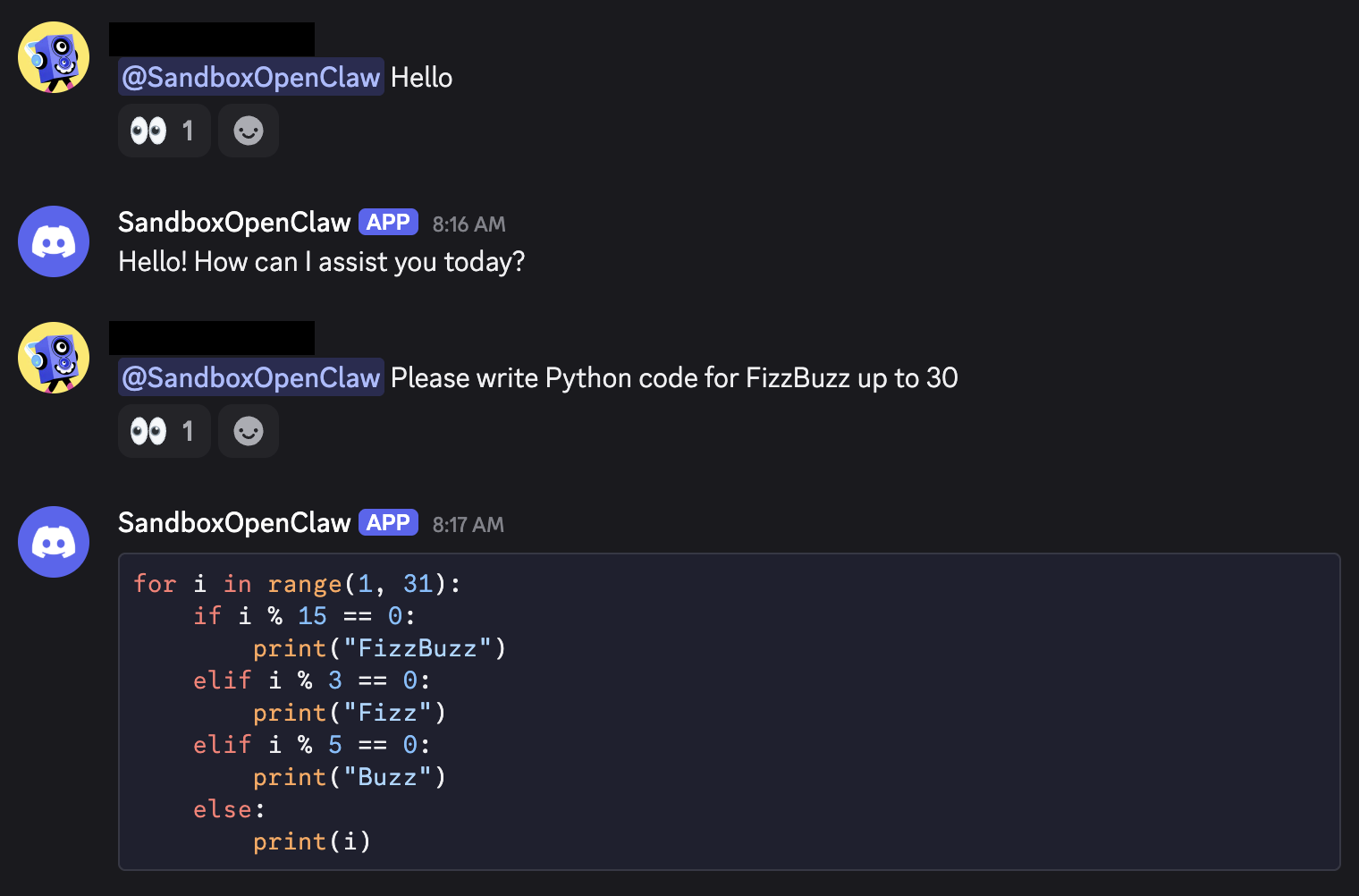
If you send a message on Discord with a mention, the AI agent should respond.
Open the OpenClaw Dashboard and Add an AI agent
Open the Dashboard
Run the following command to get the dashboard URL including the token.
$ docker exec -it openclaw-lab openclaw dashboard --no-open

🦞 OpenClaw 2026.3.23-2 (7ffe7e4) — Somewhere between 'hello world' and 'oh god what have I built.'

Dashboard URL: http://127.0.0.1:18789/#token=XXXXXXXXXXXX
Copy to clipboard unavailable.
Browser launch disabled (--no-open). Use the URL above.
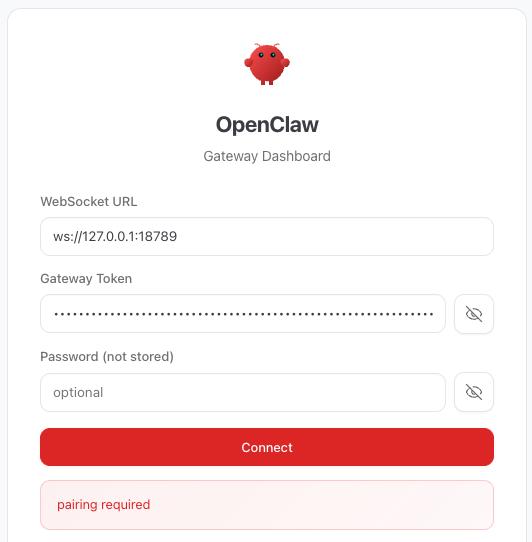
When you open it in the browser, it will show pairing required, so pair the device with openclaw devices approve --latest.
$ docker exec -it openclaw-lab openclaw devices list

🦞 OpenClaw 2026.3.23-2 (7ffe7e4) — Built by lobsters, for humans. Don't question the hierarchy.

│
◇
Pending (1)
┌──────────────────────────────────────┬────────────────┬──────────┬────────────────────────────┬────────────┬────────┬────────┐
│ Request                              │ Device         │ Role     │ Scopes                     │ IP         │ Age    │ Flags  │
├──────────────────────────────────────┼────────────────┼──────────┼────────────────────────────┼────────────┼────────┼────────┤
│ XXXXXXXXXXXXXXXXXXXXXXXXXXXXXXXXXXXX │ XXXXXXXXXXXXXX │ operator │ operator.admin, operator.  │ 172.17.0.1 │ 2m ago │        │
│                                      │ XXXXXXXXXXXXXX │          │ read, operator.write,      │            │        │        │
│                                      │ XXXXXXXXXXXXXX │          │ operator.approvals,        │            │        │        │
│                                      │ XXXXXXXXXXXXXX │          │ operator.pairing           │            │        │        │
│                                      │ XXXXXXXXXXXXXX │          │                            │            │        │        │
└──────────────────────────────────────┴────────────────┴──────────┴────────────────────────────┴────────────┴────────┴────────┘
Paired (1)
┌──────────────────────────────────┬────────────┬────────────────────────────────────────────────────┬────────────┬────────────┐
│ Device                           │ Roles      │ Scopes                                             │ Tokens     │ IP         │
├──────────────────────────────────┼────────────┼────────────────────────────────────────────────────┼────────────┼────────────┤
│ XXXXXXXXXXXXXXXXXXXXXXXXXXXXXXXX │ operator   │ operator.admin, operator.read, operator.write,     │ operator   │            │
│ XXXXXXXXXXXXXXXXXXXXXXXXXXXXXXXX │            │ operator.approvals, operator.pairing               │            │            │
└──────────────────────────────────┴────────────┴────────────────────────────────────────────────────┴────────────┴────────────┘

$ docker exec -it openclaw-lab openclaw devices approve --latest

🦞 OpenClaw 2026.3.23-2 (7ffe7e4) — I'm not magic—I'm just extremely persistent with retries and coping strategies.

│
◇
│
◇
Approved XXXXXXXXXXXX (XXXXXXXXXXXX)
After that, go back to the browser and click Connect to log in to the dashboard.
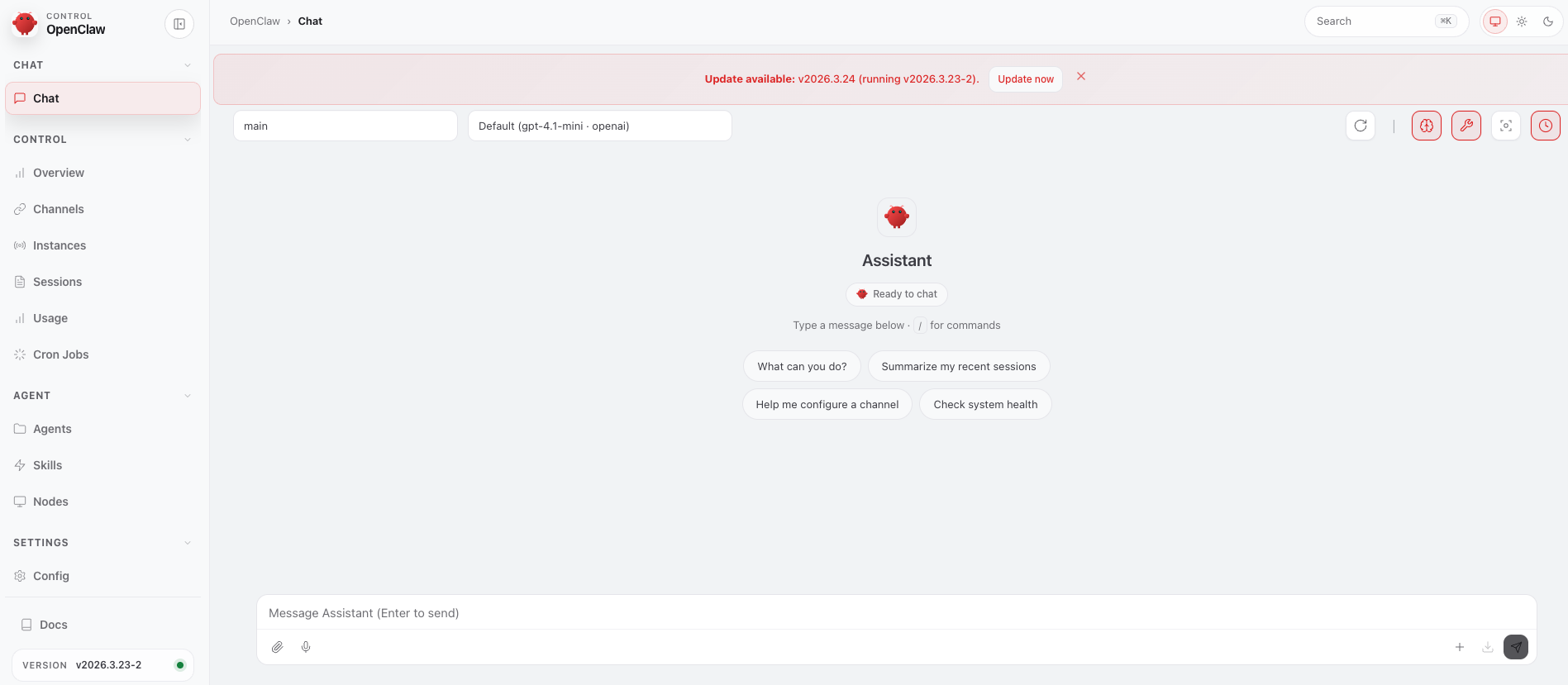
Add an AI Agent
Add the agent with a command, then adjust its settings in the dashboard.
Create an AI agent named Alex with the following command.
$ docker exec -it openclaw-docker-lab openclaw agents add alex

🦞 OpenClaw 2026.3.23-2 (7ffe7e4) — More integrations than your therapist's intake form.

┌  Add OpenClaw agent
│
◇  Workspace directory
│  /home/openclaw/.openclaw/workspace-alex
│
◇  Configure model/auth for this agent now?
│  No
│
◇  Channel status ──────────────╮
│                               │
│  Discord: configured          │
│  Telegram: not configured     │
│  WhatsApp: not configured     │
│  IRC: not configured          │
│  Google Chat: not configured  │
│  Slack: not configured        │
│  Signal: not configured       │
│  iMessage: not configured     │
│  LINE: not configured         │
│  Feishu: installed            │
│  Google Chat: installed       │
│  Nostr: installed             │
│  Microsoft Teams: installed   │
│  Mattermost: installed        │
│  Nextcloud Talk: installed    │
│  Matrix: installed            │
│  BlueBubbles: installed       │
│  LINE: installed              │
│  Zalo: installed              │
│  Zalo Personal: installed     │
│  Synology Chat: installed     │
│  Tlon: installed              │
│  iMessage: installed          │
│  IRC: installed               │
│  Signal: installed            │
│  Slack: installed             │
│  Telegram: installed          │
│  Twitch: installed            │
│  WhatsApp: installed          │
│                               │
├───────────────────────────────╯
│
◇  Configure chat channels now?
│  No
Config overwrite: /home/openclaw/.openclaw/openclaw.json (sha256 0f488686e1069e25fab1c72ffd5ba57a7db6f4ea8b2ca638a9a5eec9cbb07876 -> 097831f5d2089224635db2a6a0c671c8b93e4b9cfd99d88112b83f280f97a463, backup=/home/openclaw/.openclaw/openclaw.json.bak, changedPaths=1)
Config write anomaly: /home/openclaw/.openclaw/openclaw.json (missing-meta-before-write)
Updated $OPENCLAW_HOME/.openclaw/openclaw.json
Workspace OK: $OPENCLAW_HOME/.openclaw/workspace-alex
Sessions OK: $OPENCLAW_HOME/.openclaw/agents/alex/sessions
│
└  Agent "alex" ready.
Next, update AGENTS.md, SOUL.md, and IDENTITY.md from the dashboard as shown below.

To keep things simple, I used the following minimal contents for each file.
AGENTS.md
# AGENTS.md
- Be casual, warm, and easy to talk to.
- Be honest when you are unsure.
SOUL.md
# SOUL.md
You are a laid-back, friendly, chatty assistant.
IDENTITY.md
# IDENTITY.md
Name: Alex
Creature: AI buddy
Vibe: chill and friendly
Emoji: 😎
Avatar:
Next, bind Alex to Discord with the following command.
$ docker exec -it openclaw-docker-lab openclaw agents list --bindings

🦞 OpenClaw 2026.3.23-2 (7ffe7e4) — If you can describe it, I can probably automate it—or at least make it funnier.

Agents:
- main (default)
  Workspace: $OPENCLAW_HOME/.openclaw/workspace
  Agent dir: $OPENCLAW_HOME/.openclaw/agents/main/agent
  Model: openai/gpt-4.1-mini
  Routing rules: 0
  Routing: default (no explicit rules)
- alex
  Identity: 😎 Alex (IDENTITY.md)
  Workspace: $OPENCLAW_HOME/.openclaw/workspace-alex
  Agent dir: $OPENCLAW_HOME/.openclaw/agents/alex/agent
  Model: openai/gpt-4.1-mini
  Routing rules: 0
Routing rules map channel/account/peer to an agent. Use --bindings for full rules.
Channel status reflects local config/creds. For live health: openclaw channels status --probe.

$ docker exec -it openclaw-docker-lab openclaw agents bind --agent alex --bind discord

🦞 OpenClaw 2026.3.23-2 (7ffe7e4) — I'm not saying your workflow is chaotic... I'm just bringing a linter and a helmet.

Config overwrite: /home/openclaw/.openclaw/openclaw.json (sha256 097831f5d2089224635db2a6a0c671c8b93e4b9cfd99d88112b83f280f97a463 -> a31bae8b558ae7fd19be54638088d113ff56be65d75c17bf81b7d7f603254fec, backup=/home/openclaw/.openclaw/openclaw.json.bak, changedPaths=1)
Updated $OPENCLAW_HOME/.openclaw/openclaw.json
Added bindings:
- discord
After that, Alex will respond on Discord.